ProductDelivery days & routes
Your trucks, your days, your rules.
Distribution software that assumes a parcel carrier gets food delivery wrong. Model the way you actually deliver: set days per zone and a real order cutoff, and buyers only ever see slots you really run.
Delivery days and zones
Define your zones and which weekdays you serve each one. At checkout, a buyer in Tuesday-Thursday territory sees Tuesday and Thursday, never a promise your route can't keep.
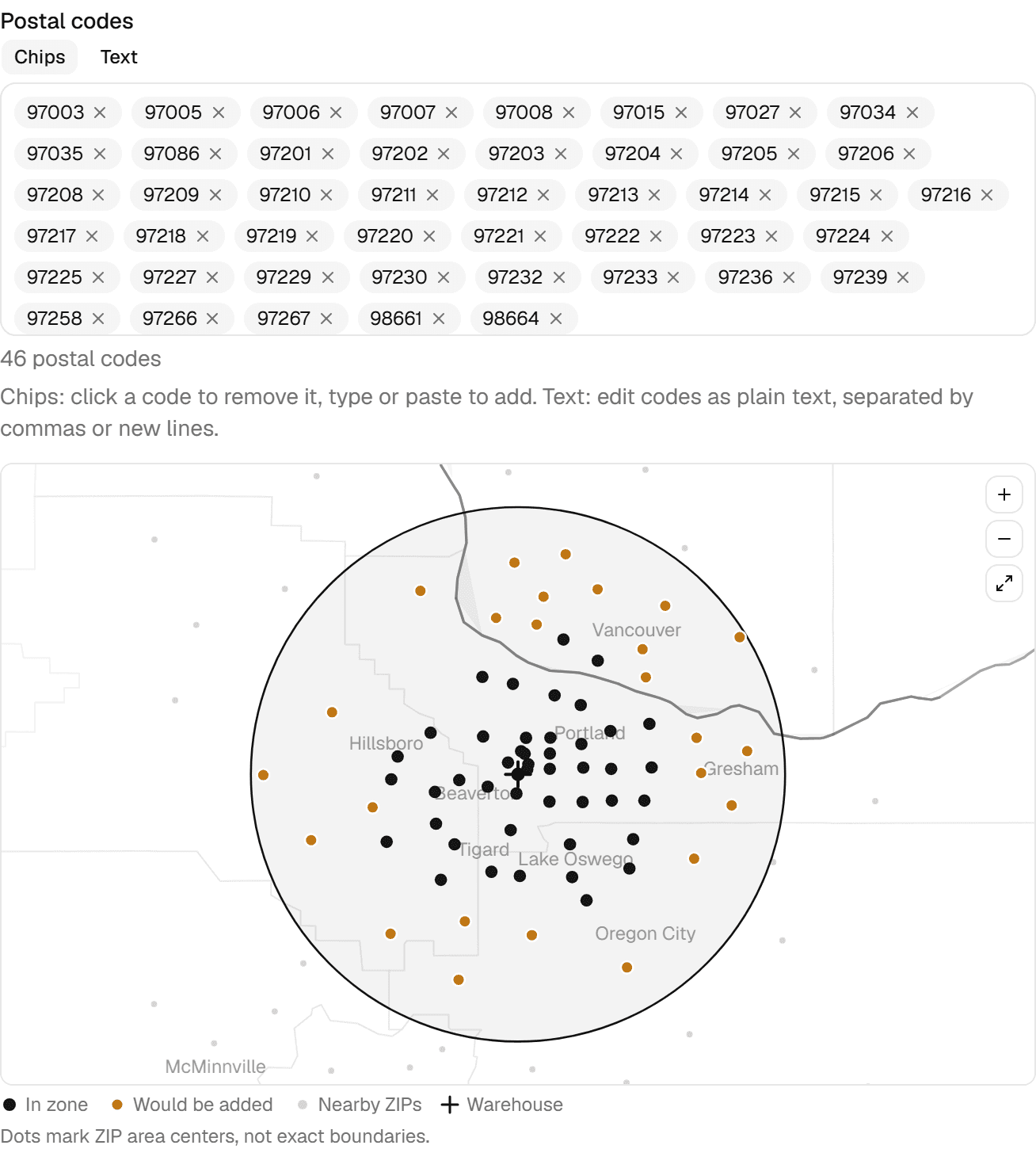
Zones from a ZIP and a radius
Enter your warehouse ZIP and a radius in miles and the builder prefills every ZIP code inside it from Census data. The zone stays an editable list of chips: click a code to drop it, paste a whole spreadsheet column at once (duplicates caught for you), or flip to plain text. Re-run a wider radius later without ever losing a hand-picked entry.
A real map under your dots
Land and water, county lines, and nearby city names render beneath your ZIP dots, every layer from bundled Census data with no external map service or API keys. Zoom and pan, watch the radius circle while a prefill is pending, and spot a stray code before it becomes a routing surprise.
Order cutoff times
Set a cutoff like "order by 6 PM for next-day delivery" and the storefront enforces it for you. Dates that have closed simply stop being offered, the deadline is spelled out at checkout, and an order submitted a minute too late is politely refused and moved to the next open day.
Your clock, your lead time
Pick the cutoff time, how many days before delivery orders close, and your timezone. One day ahead is the classic order-by-6-for-tomorrow promise; zero days enables same-day ordering right up to the cutoff.
Enforced, not suggested
The deadline holds even against a stale browser tab, so late orders never sneak onto a loaded truck and saying no stops being your job.
Own-truck, pickup, or parcel, chosen per order
Route orders on your own vehicles, offer warehouse pickup as the pressure valve, or ship the odd order by parcel: enter the carrier and tracking number yourself on any plan, or buy the label through your own Shippo, ShipStation, or Speedship account on the Enterprise plan's shipping labels feature. It's a choice per order, not a platform-wide setting.
Own-truck routes
Group the day's orders by delivery day and zone and run the route you planned.
Scheduled pickup
Buyers book pickup like a delivery: they choose a date from the same days and cutoff your routes run, and see your pickup address and instructions at checkout and in their confirmation.
Parcel when it makes sense
Ship the exception by parcel: enter carrier and tracking on the order on every plan, or compare live rates and buy the label from your own Shippo, ShipStation, or Speedship account on Enterprise.
One pick list for the whole day
Pick a date and every order for that day rolls up into a single warehouse pick list. The crew pulls 89 tomatoes once, instead of walking the same aisle for every order.
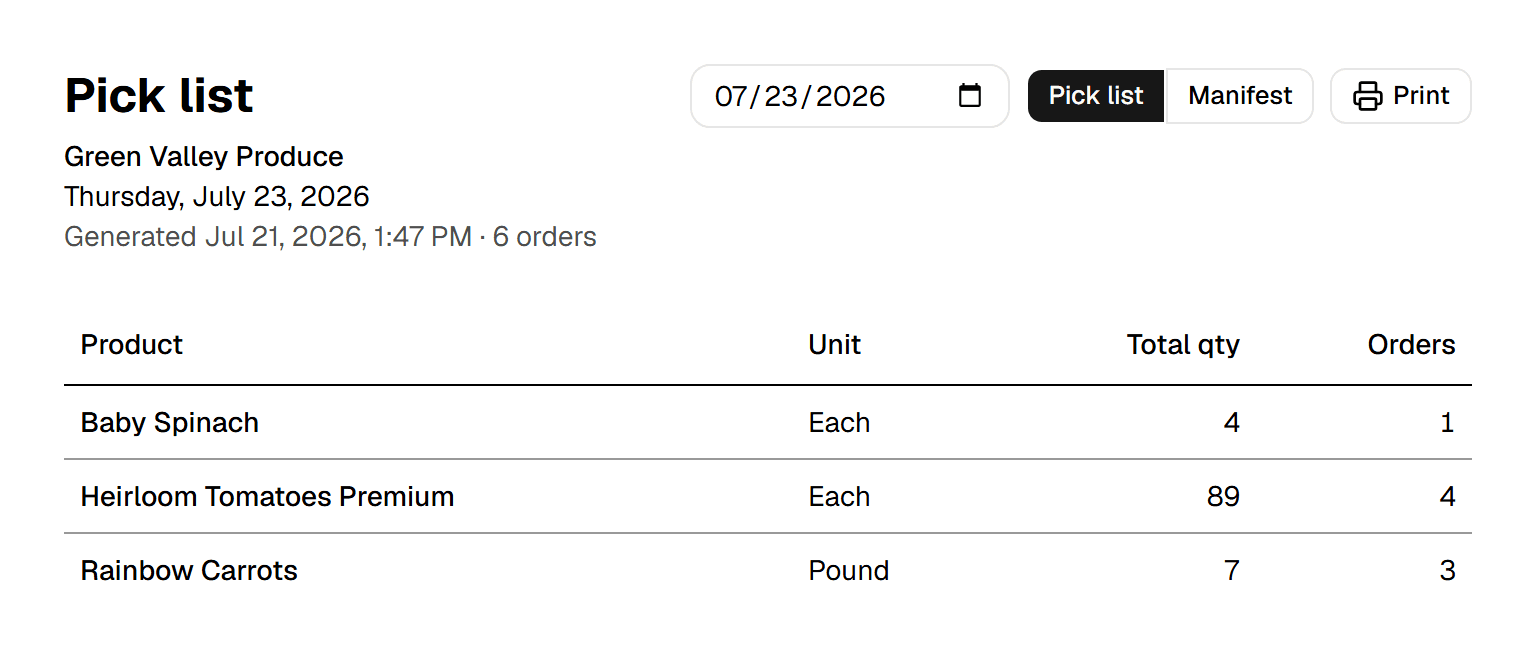
One line per product and unit
Totals across all of the day's orders, with the number of orders each line came from. Pounds never add into cases, and a renamed product stays one line.
Always current
Sheets generate from live orders the moment you open them: a cancelled order drops out by itself, and a late order never gets missed.
Print it and go
One clean black-on-white sheet for the clipboard, and the morning starts on paper that already agrees with the storefront.
A manifest for the route, stop by stop
The same day splits back out as a delivery manifest: every stop under its zone in route order, with everything the driver needs at each door. Per-order packing lists are still there when you want a sheet inside each box.
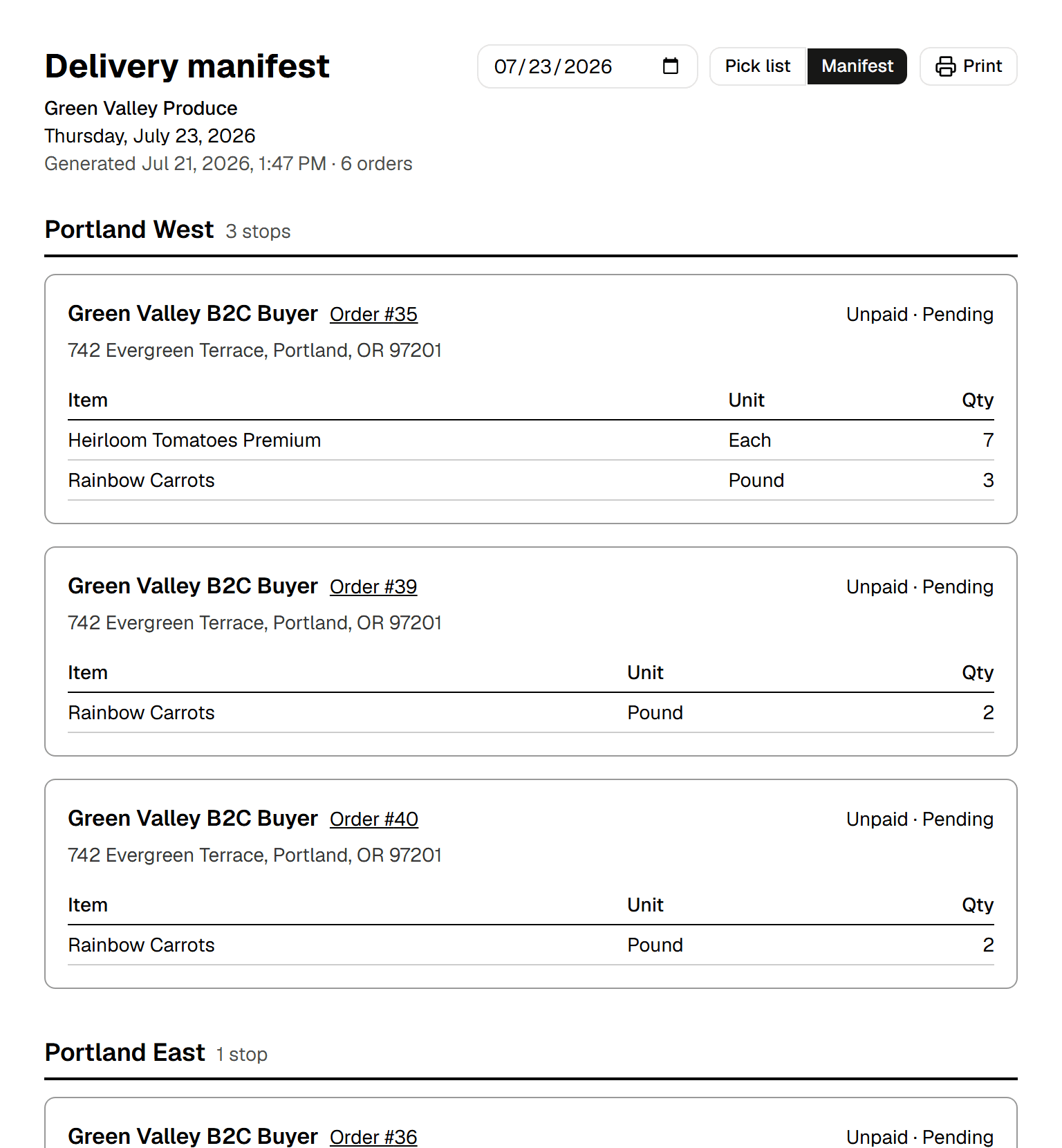
Grouped by your zones
Stops sort under the zones you configured, in the order you drive them, each with the customer, the address, and the items to hand over.
Payment state on every stop
The driver sees at a glance whether a stop is paid, on account, or has money to collect at the door, and an online payment still in flight is marked so nobody asks twice.
Pickup and unzoned, never lost
Scheduled pickup orders collect in their own group at the end for the counter, and a stop outside every zone is flagged as unzoned instead of silently dropped.
Included in Launch at $49/month + 2% of card sales.
Questions, answered.
Can I set an order cutoff time like "order by 6 PM for next-day delivery"?+
Yes, on every Minori Midori plan. You pick the cutoff time, how many days ahead orders close, and your timezone. Dates that have closed stop being offered at checkout, the deadline is spelled out to the buyer, and an order submitted a minute late is refused and moved to the next open day, even from a stale browser tab. Setting zero days ahead enables same-day ordering right up to the cutoff.
How do delivery zones work?+
You define zones and which weekdays you serve each one, and buyers only ever see slots you actually run: a buyer in Tuesday-Thursday territory sees Tuesday and Thursday. In Minori Midori a zone is a list of ZIP codes, which you can prefill from your warehouse ZIP plus a radius in miles using bundled Census data and then edit by hand before saving.
Can customers pick up instead of getting a delivery?+
Yes. Buyers book a pickup date from the same delivery days and cutoff rules your routes run on, and see your pickup address and instructions at checkout, in their order email, and on the order page. Fulfillment is a choice per order in Minori Midori, not a store-wide setting: own truck, warehouse pickup, or a parcel carrier, with tracking entered by staff on every plan or a label bought through your own Shippo, ShipStation, or Speedship account on the Enterprise plan.
What does my warehouse crew work from on delivery morning?+
Two printable sheets generated live from the day's orders. The pick list rolls every order for that date into one line per product and unit, so the crew pulls 89 tomatoes once instead of walking the aisle per order. The manifest splits the same day back out stop by stop under its zone, with the address, the items and the payment state at each door; pickup orders collect in their own group. Both are included on every plan.
Take your first order this afternoon.
Create your store, pick a subdomain and add a product. No sales call required. Prefer a walkthrough first? We'll show you the whole thing.